Home  >  Category  >  レーザープリンター  >  ファイバーレーザープリンタ  > hot sale Domain laser 30W 55W CO2 laser marking machine for bottle wood leather printer price
カテゴリを閲覧する
DODインク
ドミノのための消耗品
イマージュ用消耗品
Videojet 用消耗品
ウィレット用消耗品
シトロニクス用消耗品
日立向け消耗品
Linx および EC の消耗品
ロットワイル用消耗品
メトロニック用消耗品
KGK用消耗品
インクジェットプリンター
インクジェットプリンターのスペアパーツ
TIJプリンタ
レーザープリンター
コンベヤーおよびページングマシン
その他
ゼブラスペアパーツ
ユニバーサルの消耗品
LPA プリンター
Ecjet Spare Parts
国防総省プリンター
中国ブランドプリンター用消耗品
最新ニュース

VideoJet 2351説明ビデオを見る方法は?

現在、それは中国のインターフェースです。ここに印刷ファイル、印刷頻度、現在のカウント、および言語ポイント設定を切り替えます。 [コントロール]をクリックします: 切り替えるために言語を入力してください: ここには日時の表示があり、プリントの総数が表示されます。 ここにスタートボタンがあります: 実行されて停止します。左下隅を使用して遅延を調整し、印刷遅延が内部で調整され、最大値は3,000、最小は...

VideoJet 8520マシン印刷コンテンツの変更と印刷を確認する方法は?

VideoJet 8520マシンの印刷コンテンツの変更と印刷: Aleadyのセットアップがあるテンプレートを編集できます。 2番目のテンプレートを選択します。 「OK」をクリックしてください。これが編集可能なコンテンツ、1,2,3,4,5です 最初のものを選択します。 自分で編集して、削除するなど、 編集後に「Enter」をクリックし、後半の03を表示します。 日付について、これとして編集するこ...

TTOサーマルトランスファーコーディングマシン:Weidijie 6230マシンの基本操作

ツール内の言語を交換します。ツール内の言語を置き換えます。 次に、設定を入力し、ポイントコントロールを入力します。言語設定があります。 設定の最初のものはノズルであり、消耗品と制御があります。 ノズルヘッドには、水平スケール、垂直定規、印刷の遅延、印刷速度など、一般的に使用される設定があります。 前のステップに戻り、消耗品、色の帯域幅、リボンの色、カラーストラップ: 次に、言語、画面修正、日付時間...

VideoJet 8520マシンの表示方法:メインインターフェイスパラメーター(消耗品、速度、印刷数量、遅延)の紹介と情報選択?

合計4つのノズルがあるため、これは4つのカートリッジの使用です。オンになっていないため、インクカートリッジは挿入されず、インクカートリッジが挿入された後に実際のインクボリュームを見ることができます。メインインターフェイスには、速度、プリント数(この情報が印刷された回数を参照)、およびプリントの総数(マシンの合計が印刷された回数を参照)が表示されます。 [ジョブ](メッセージ名を参照)をクリックし、...

videojet to hotトランスファーコードマシン6330プリントヘッドオープニング方法とリボン巻線方法

ここにボタンがあり、それを押すとドアが開きます: その後、引き出します: 次に、その絡み合い方法と矢の方向の傾向を見ることができます。 ノズルはこちらです。掃除するときは、ほこりのない布を使用してアルコールを浸し、一方向に拭きます。 インストールは上の口に直接向いて、直接挿入し、両手で激しく屈みます。スナップが聞こえたら、すでにインストールしています。

VideoJet 1240 1280 1580インジェクションマシンインターフェイスの紹介と一般的に使用されるツール説明

メインインターフェイスについて話しましょう。左から右へ、製品のカウント、印刷カウント、総印刷、合計実行時間。右側の溶媒の割合とインクの割合: 上から下への左ボタンは、メインインターフェイス、操作、調整、ツール、ログイン、キャンセルです。 ログインパスワードはここに入力されています: ツールを見ると、最初の行は、パフォーマンス、消耗品、生産構成、ファイル管理、およびフィールドエディターのマージです。...

VideoJet 1240 1280 1580ジェットマシン情報の情報を編集するにはどうすればよいですか?

まず、新しい情報を作成し、最初に宿題を注文してください。 このプラスキーをクリックして、情報に名前を付けます。 次に、情報を挿入し、追加番号をクリックする必要があります。テキスト、日付、時刻、カウンター、バーコード、QRコード、ロゴなどがあります。 テキストの編集は、フォントサイズおよびその他の設定を選択できます。 編集ボタンそれぞれ左から右に情報を追加し、選択情報を編集し、上下に移動し、左と右に...

VideoJet 8520マシン:インストールの考慮事項

カートリッジを取り付けるときにブルートフォースを使用しないでください、静かにインストールします。 プラグを抜くときは、チップがあるため、穏やかに引っ張ってください。ブルートフォースを使用すると、インクカートリッジまたはマシンが損傷します。 データケーブルをインストールするときは、揺れずにしっかりと固定する必要があります。 コントローラーのプラグも締める必要があり、揺れはないはずです。 ノズルはコン...

VideoJet 8520マシン:光電子を調整する方法

インクカートリッジがインストールされたら、マシンの仕組みを見てみましょう。 今はオフです。 青いボタンをクリックして起動します。 オフラインの場合は、緑色のボタンを押して実行します。 これは、カートリッジの真の残りの量です。 製品がない場合、製品が検出されると光電センサーが緑色の光をオンにします。 実行ボタンを押します。 保証された操作の場合、以下の製品がない場合、信号は与えられません。緑色の光が...

VideoJet 8520マシン:印刷ヘッドを掃除する方法印刷品質が良くない場合は?

[設定]をクリックします。 消耗品をクリックしてください。 次に、きれいな布または紙を下に置きます。 クリックしてノズルを掃除して確認します。 これは、掃除後のように見えるものです。 掃除後もまだ良くない場合は、マシンをオフにします。まず、赤い実行ボタンをクリックし、[青色のシャットダウン]ボタンをクリックします。 シャットダウンした後、スイッチを押します。 次に、インクカートリッジを取り出し、ど...

VideoJet TTO6230 E3334またはE3337トラブルシューティングガイドライン

製品:6230 トピック:トラブルシューティングの概要 E3334またはE3337の障害のガイドライン: 「E3334 PrinThead Actuator」または「E3337 PrinTheadには多くの可能性のある原因があります アクチュエータの位置6230プリンターで発生する可能性のある障害、次を参照してください トラブルシューティングのためのガイドライン。 考えられる根本原因は次のとおりで...

ビデオジェット8520マシンインクカートリッジのインストール方法?

まず、カートリッジを糸くずのない布で一方向に拭きます。前後にこすらないでください。 固定プレートを持ち上げます。 カートリッジは傾いています45°、そっとスライドさせます。 もう一度押し下げると、インストールされています。この方法で4つのインクカートリッジをすべて取り付けます。 注:金属指のインクカートリッジに当たらないでください。そうしないと、損傷します。インクカートリッジの頭をこの穴の方向に直...

VideoJet 1000シリーズプリンターの圧力ポンプを取り外してインストールする方法

1.ビデオジェット1000シリーズプリンターの圧力ポンプを取り外す方法? カバーの上のネジを外します。 取り外しが完了したら、ボックスを開いて、内部に2つのケーブルがあり、削除します。それを脱いでください。 注:これら2つのワイヤーとソケットは1対1の通信である必要があります。また、この方法でもインストールする必要があります。インストールするとき。 開いた後、ポンプを見ることができます。 ポンプか...

VideoJet 8520マシン:マシンの組み立て方とシステム構成が初めてセットアップされた方法

スプリンクラーを取り付けます。マシンには合計4つのノズルがありますが、ノズルがいくら数であるとしても、インストール方法は同じです。 ノズルを修正します。 最初、2番目、3番目、4番目のノズルの側面にネジ穴があります。ネジを穴に固定し、締めます。 次に、以下のコンビネーションボードのネジを固定します。コンビネーションボードは、ノズルの下部を固定するために使用されます。これらの3つのネジを締めます。...

ウィレット430マシン用のインクときれいなマシンから引き出す方法は?

メインフィルターを取り外します 次に、パイプで短くします このボトルを開きます 空のボトルを見つけて、このセクションを引き出します チューブをボトルに挿入します システムでは、ノズルパイプがクリーンであるか、コードプリンターをすばやく起動しているかどうかを確認し、クリックして確認してください ここからインクジェットを開始します インクを排出し、パイプを接続します 混合シリンダーのネジに洗剤を追加し...

ビデオジェットインクカートリッジ、バルブモジュール、および印刷モジュールの交換用注意

分解とインストールでは、3つの大きな部分があります。インクコアに注意を払い、このジョイントに注意を払う必要があります。きついで、ギャップがなく、ガスがなくなってはいけません。 このポンプに注意してください。必ず設置してください。 また、交換すると、両側にガスケットがあり、欠落できないことにも注意する必要があります。 このバルブに注意してください。インストールした後、テストし、アドバンスドパスワード...

Unicorn IIプリンターを組み立てる方法

2つの固定ブロックをその上に取り付け、両側にネジを取り付けます 次に、このブラケットシリンダーを通り抜けてネジを締めます 締めた後、ここにはアダプターブロックがあります。これは全体のアダプターブロック全体です。その後、ブラケットシリンダーを入れます。 袖が入った後、ネジを締めます ネジを締めた後、ステンレス鋼のシリンダーを下に置き、ネジを締めます 締めた後、下のコンベアベルトに固定ブロックが固定さ...

VideoJet 43sを掃除する方法

VideoJet 43Sインクが排出された後、約500mlの洗浄溶液を追加して洗浄し、約20分間洗浄し、2〜3回洗浄し、約20分間走って操作を一時停止する必要があります。 パイプを取り外し、パイプの片端を廃棄物液体バケツに入れ、機械からインクを排出し、すべての廃棄物液を内部に排出します。

ビデオジェットインクコアのインストールとインクコア分類の説明

1.インクコアの取り付け方法 このことを最初に取り外してから、側面の2本のネジを取り外します。ネジの部分を取り外した後、インクコア全体を取り外すことができます。 2.インクコア分類 インクコア、a、b、c、d、eには5つのタイプがあります。これはcタイプのインクコアです その中には、AとBには3セットのバルブがあり、C、D、およびEには2セットのバルブがあります。 インクコアボードを取り外し、4本...

パワー430マシンを解体する方法?

最初にカバーを削除します: このことをもう一度取り下げます: これらのワイヤーを削除します: 削除する ネジ: キーボードを取り出します: これらの4本のネジを取り外すと、ディスプレイを取り外すことができます。 メインボードを取り外して、これらのワイヤーを最初に取り外します。 下のすべてのケーブルを引き出します: インクリムーバーコントロールボード: 電源コードが切断されると、インクマシン制御ボー...
お問い合わせ
お問い合わせ、最高のサービスと費用はあなたのためです。 Contact Now
hot sale Domain laser 30W 55W CO2 laser marking machine for bottle wood leather printer pricehot sale Domain laser 30W 55W CO2 laser marking machine for bottle wood leather printer pricehot sale Domain laser 30W 55W CO2 laser marking machine for bottle wood leather printer pricehot sale Domain laser 30W 55W CO2 laser marking machine for bottle wood leather printer pricehot sale Domain laser 30W 55W CO2 laser marking machine for bottle wood leather printer price

hot sale Domain laser 30W 55W CO2 laser marking machine for bottle wood leather printer price

  • Specifications
  • Application:
  • Laser Marking
  • Condition:
  • New
  • Laser Type:
  • CO2
  • CNC or Not:
  • Yes
  • Cooling Mode:
  • Air Cooling
  • Control Software:
  • Software
  • Graphic Format Supported:
  • AI, BMP, DST, DWG, DXF, DXP, LAS, PLT, PSD
  • Working Accuracy:
  • 0.01mm
  • Place of Origin:
  • Jiangsu, China (Mainland)
  • Brand Name:
  • Cheef
  • Model Number:
  • CFCL10W
  • Power(W):
  • 10W/20W/30W/50W
  • Certification:
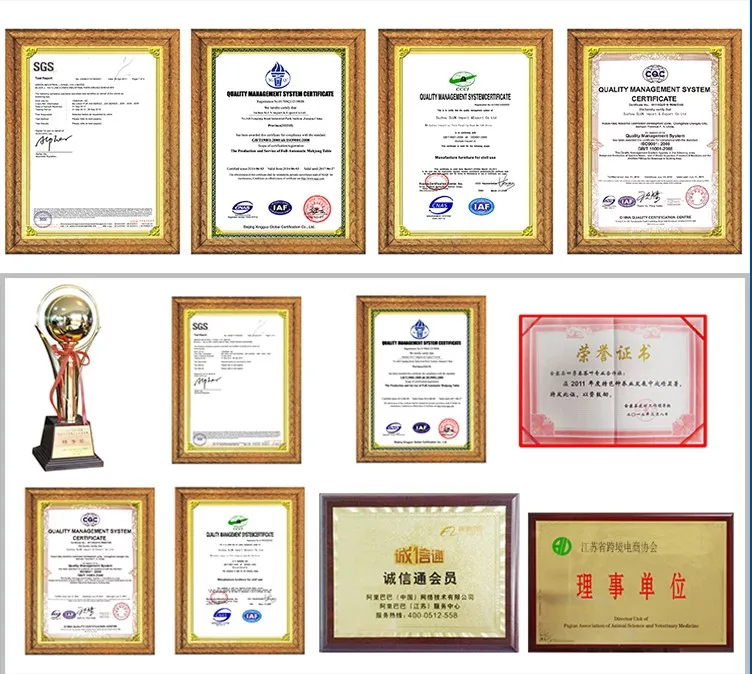
  • CCC, CE, GS, ISO, SGS, UL, 9000
  • After-sales Service Provided:
  • Engineers available to service machinery overseas
  • Applicable Material:
  • Plastic
  • Laser Power:
  • 10W/20W 30w 50w(Optional)
  • Keywords:
  • co2 laser marking printer
  • Warranty:
  • 2 Years
  • optical maser:
  • imported optical maser
  • Laser wavelength:
  • 10.64um
  • Marking Speed:
  • 0-7000mm/s
  • Marking Depth:
  • 0.01-2mm
  • minimum character:
  • 0.02mm
  • precision:
  • -0.01~+0.01

laser rubber stamp making machine LY-340

What is details of our co2 laser marking machine?

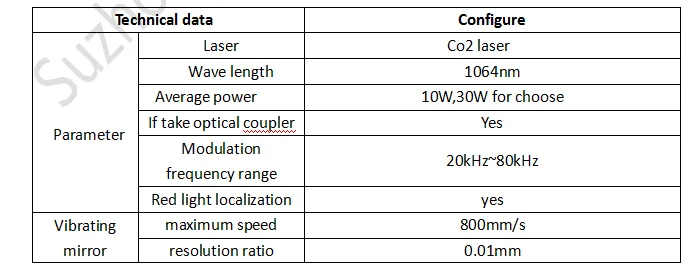
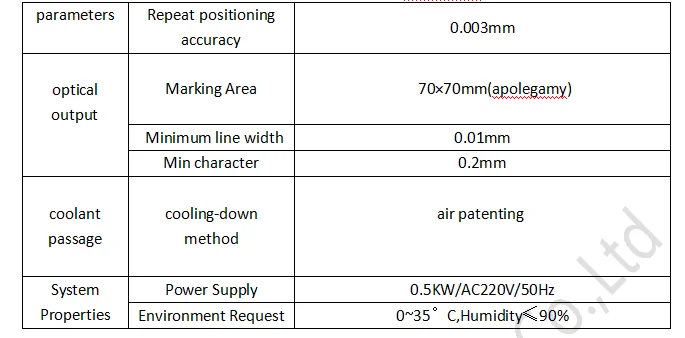
 parameter 1.png

    parameter2.png


1) laser are derived from the military technology;
2) laser pulse width, high peak power, high unafraid against;
3) laser are built-in light, red light positioning function;
4) the traditional optical isolation technology can cause 10% of the laser energy loss, using polarization independent optical isolation technology, the energy loss is only 1%.
5) good monochromaticity, lens reflection energy loss is small, processing of good quality;
6)Laser equipment with laser module and laser light power separation mode, convenient after-sale repair and maintenance process every time only replace power or light module, without the overall return to factory maintenance, greatly reduce the maintenance time of the clients.

What Advantage of our co2 laser marking machine?

1) Excellent beam quality, suitable for precision, fine code
    CJ series optical beam quality of laser printer is much better than traditional flash lamp pumped and semiconductor pumping solid laser printer , it is for the base model output, divergence Angle is small.especially suitable for high precision, fine code print.
2) Small size, easy handling, achieve more portable
   CJ series of laser printer’s weight and the area is 1/10 and 1/4 compared with the flash lamp pumped solid state laser printer, it can save space, easy to handle. Able to meet the requirements of working site often change to realize portable products.
3) The laser output power is stable, equipment has high reliability
    Energy fluctuation is less than 2%, to ensure the stability of the laser code quality; 
4) High efficiency, low energy consumption, save the cost
    Electro-optic conversion efficiency was 30%, the equipment is only 200 ~ 500 w, is 1/10 of the flash lamp pumped solid state laser printer, long-term use can save a lot of energy expenditure for the users. 
5) Independent intellectual property rights of software operation, simple operation, powerful functions
    Our laser print can marking vector graphics, text, bar codes and qr code, and it can be upgraded to realize online code, automatic code date, shift, batch number, serial number, support the PLT, DXF, BMP, AI file formats, and directly use SHX, TIF font.
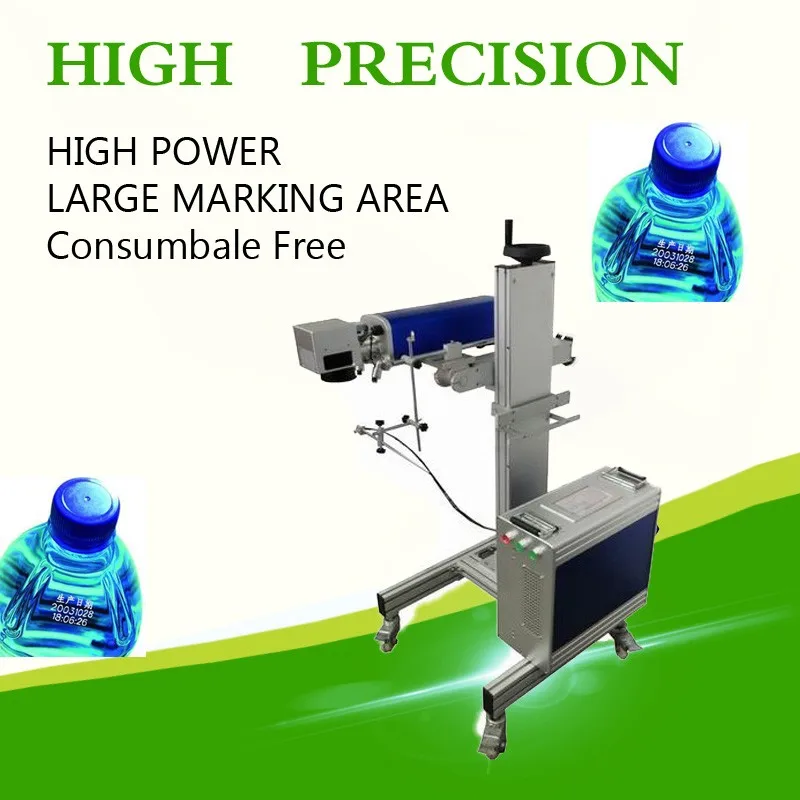
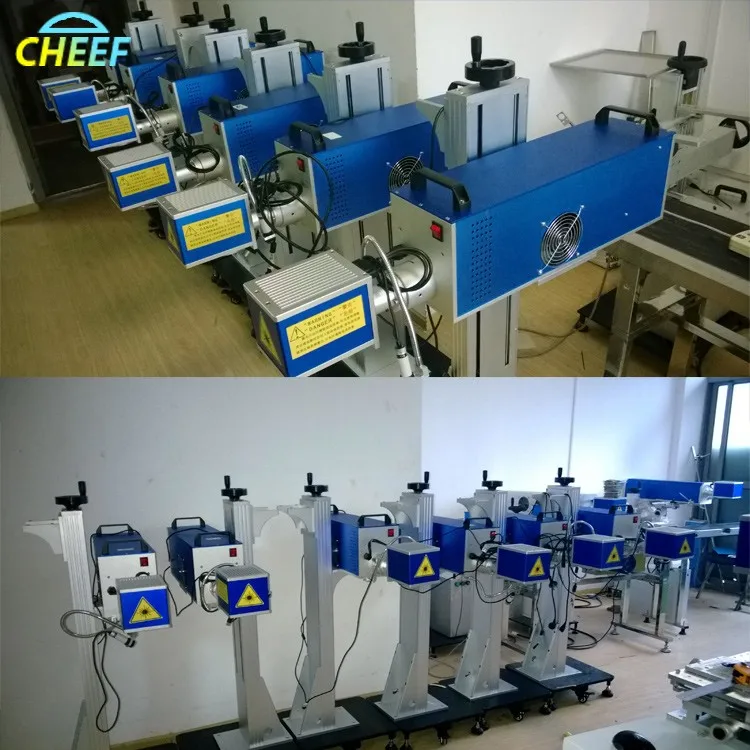
Product Pictures

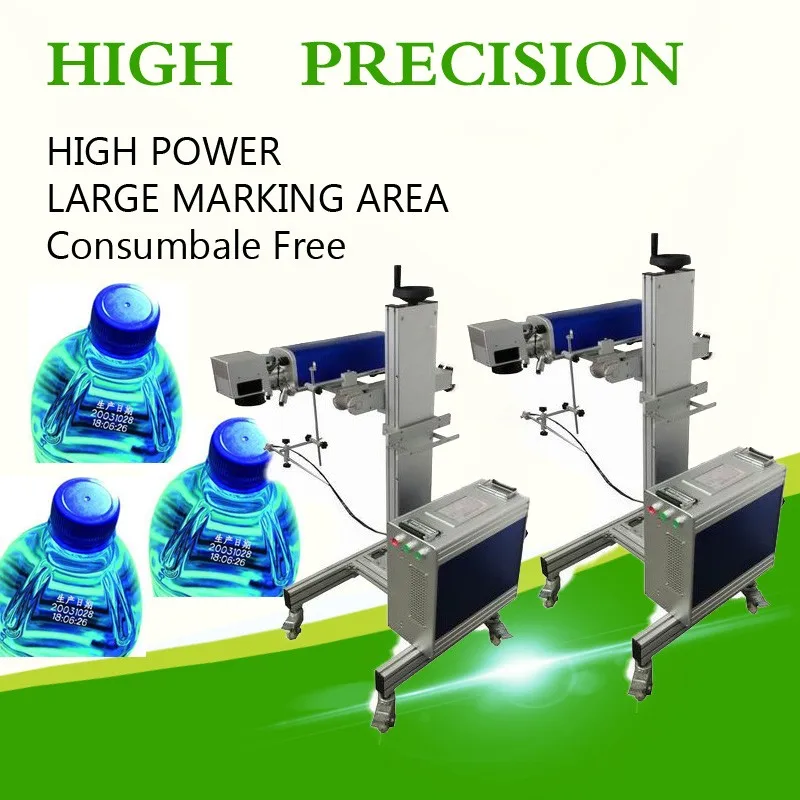
laser-printer55laser-printer73laser-printer67

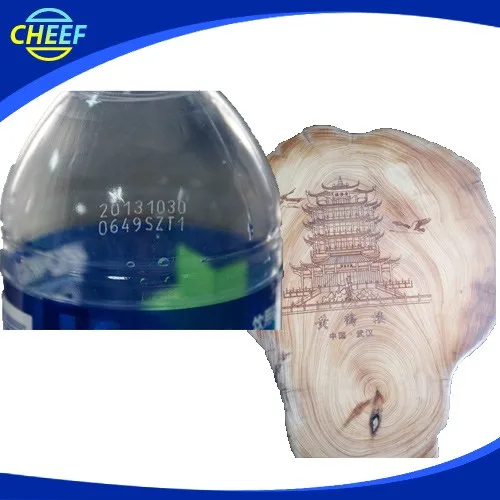
Print Effect 

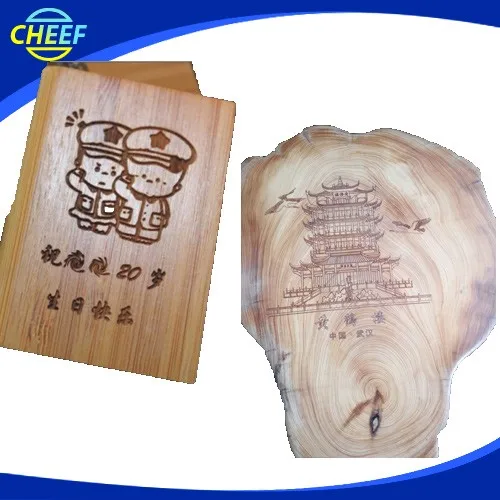
laser-print-effect-01.jpg

laser-print-effect-02.jpg

Why Choose Us?

laser-print-effect-03.jpg

Why choose us.jpg

Related Products-Fibre Laser Printer

laser-printer-53

FAQ

Q1: How to select a suitable laser printer?

 A: Please tell us below request.

   1. Print Content

   2. Products or material which you want to print

   3. Output:how many products your line can produce per hour?

 According to these information, we will suggest you the best suitable laser printer.


Q2: If laser printer can used on production conveyor?

 A: Yes,sure,our printer can be used on production line or with the conveyor.


Q3: How many years of the Warranty Time?

A:Normally is 13 months, within this period we will send spare part free to you if there are any problems with them (except artificial damage).


Q4:How to run and stall the machine?

 A:Our technician have installed the machine before shipping. For some small parts installation,we will send detail training video , users manual along with the machine.

It is easy for install.


Q5:How can I do if the machine goes wrong?

 A:If confronted with such problem,please contact us asap. We will help you solve it immediately.


Q6:What is the strong points of this laser print?

A:There are four main strong poins not limited to these items

1.The equipment is small in size, easy to install, no maintenance, less power consumption. Unique integrated fully integrated design, optical, electronic, and mechanical devices are highly integrated.

2.the high-speed galvanometer laser marking header, marking speed, with a high quality beam, long service life, installation characteristics of flexible and convenient maintenance and so on.

3.Special laser printing software, simple operation, no poison, no pollution, high stability, low failure rate. It can meet the needs of more than most of the various types of production line.

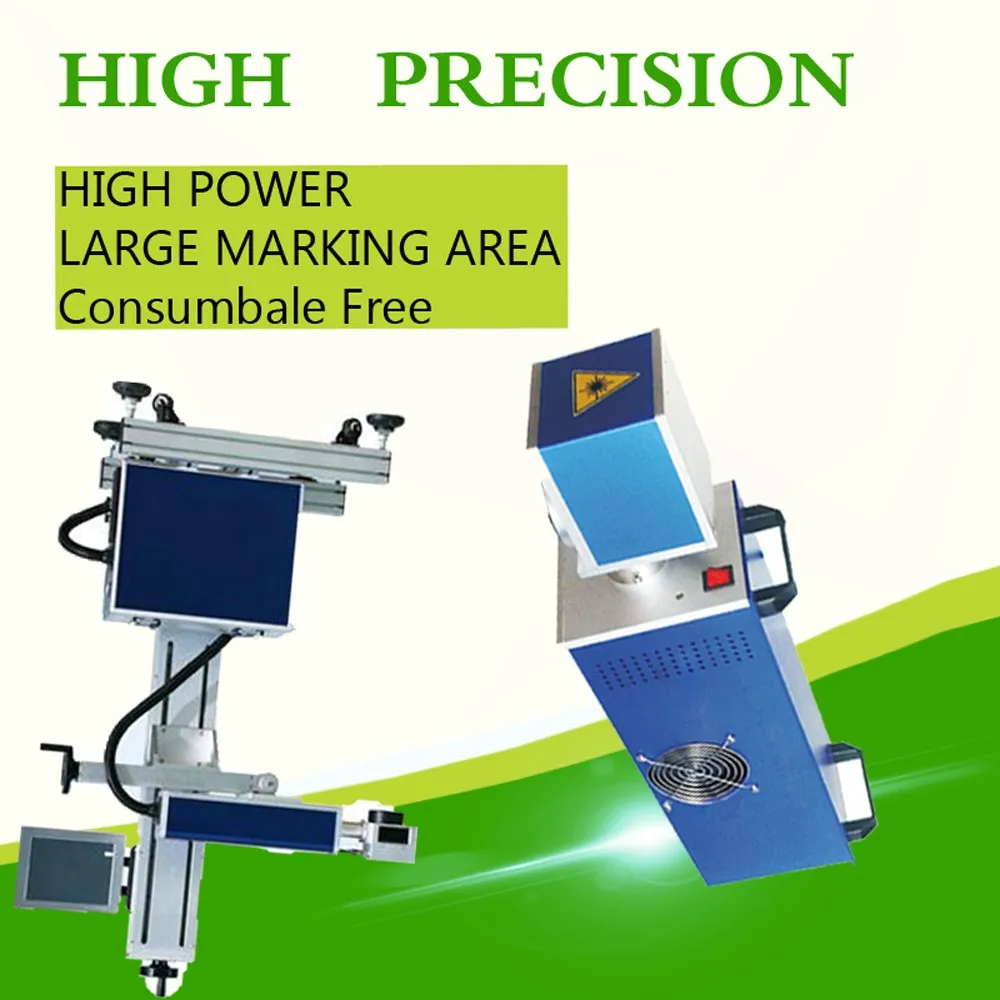
4.And the most important is that it is no need to do the maintenance, the laser print is consumable free.


Q7:What you can do for us except provide printer?

A: We can provide technical services,lifelong service,file services,language,and training,and so on.

Technical services: We have professional engineers available to service machinery overseas, once we receive your inquiry about fault, we will reply you within 24 hours, and offer you any technical service about machine.

Lifelong Services: We provide lifelong services for all the products we sold out, and supply the spare parts with competitive price.


File Services:  We can supply Manual Specification, Operating Video and other files you need.


Language: We have a professional sales team who are good at English to ensure zero communication barriers.

Training:We can provide training for your guys, you can send your guys to our factory, we are responsible for your training them.


Q8:Which material can be print?

A:widely used in food, beverage, tobacco, electronics, medicine, leather, alcohol and other industries. Applicable materials: paper, plastic, film, foil, wood, glass, PVC, ABS etc..


Q9:Which content of your printer can be print?

A:Our laser print can marking vector graphics, text, bar codes and qr code, and it can be upgraded to realize online code, automatic code date, shift, batch number, serial number, support the PLT, DXF, BMP, AI file formats, and directly use SHX, TIF font.
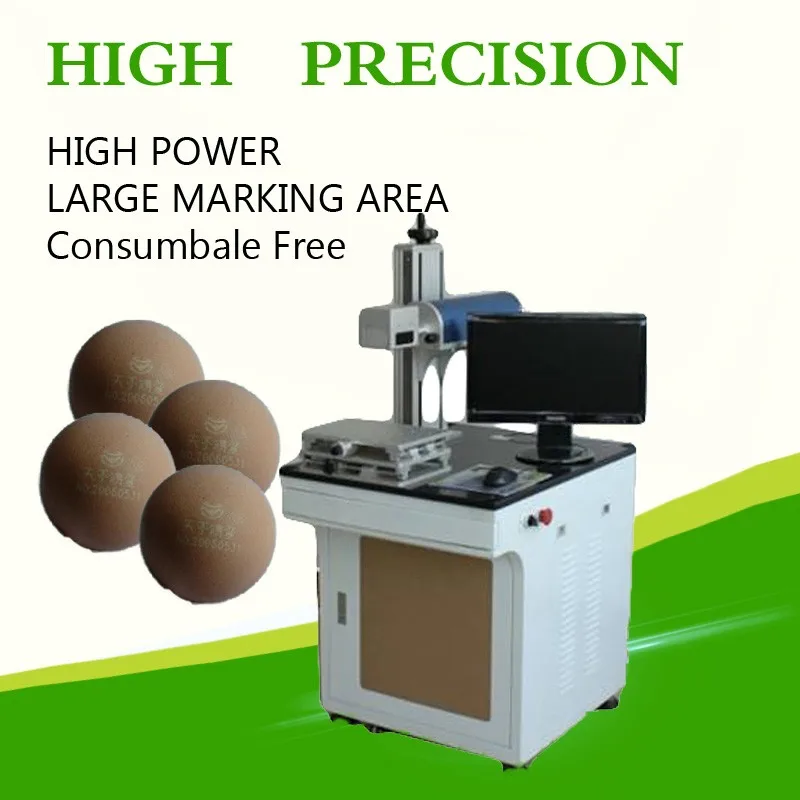
 

Q10: How to ship it?

 A:We provide the express, air shipping and sea shipping according to your order quantity or using your forwarder.We will provide the best suitable and economical shipping for you to choose. 


Q11: How to place an order?

 A: You could place an order on trade assurance or place to us directly.


Q12: How to contact us?

 A: You could email us or send us inquiry through alibaba below.


How to contact us ?

Send your Inquiry Details in the Below , Click “Send” Now !


Suzhou Cheef Technology Co.,LTD

Tel:86-512-62810865

Contact Person:Inkjet cheef

Send Inquiry

    Verification code

    Online Service